Process Overview
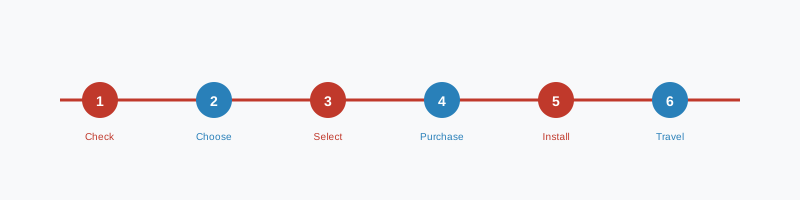
Getting an eSIM from Airlo Mobile Site is a straightforward digital process. From purchase to activation, the entire process typically takes under ten minutes. The timeline below shows each stage at a glance. Consult the selection matrix before starting to ensure you choose the right plan.
Step-by-Step Guide
-
1
-
2
-
3
-
4
-
5
-
6
-
7
-
8
-
9
-
10
Preparation Checklist
Before purchasing your eSIM, work through the following checklist to ensure a smooth experience.
Boundaries and Exceptions
The following limitations and exceptions apply to all Airlo Mobile Site eSIM plans. Please read these carefully before purchasing.
- eSIM plans are data-only. Voice calls and SMS are not included.
- eSIM profiles are locked to the device on which they are installed and cannot be transferred.
- Deleted eSIM profiles cannot be restored. A new plan must be purchased if the profile is accidentally deleted.
- Plans are valid from the date of first use, not the date of purchase.
- Unused data is forfeited at the end of the validity period and does not roll over.
- Coverage is subject to local network availability and may vary within a country.
- Plans are for personal use only. Commercial resale of data is prohibited.
- We do not offer plans for countries subject to international sanctions or where eSIM is legally restricted.
- Activation in a country not covered by your plan will result in no connectivity — not unexpected charges.
- Customer support is available during UK business hours (Monday–Friday, 9:00–17:30 GMT).
Support During the Process
If you encounter any issues during the purchase or installation process, our support team is available to assist. Contact us at [email protected] with your order number and a description of the issue.
For common installation issues, refer to our FAQ page, which covers the most frequently encountered problems and their solutions.